Organize your services into categories for easier management.
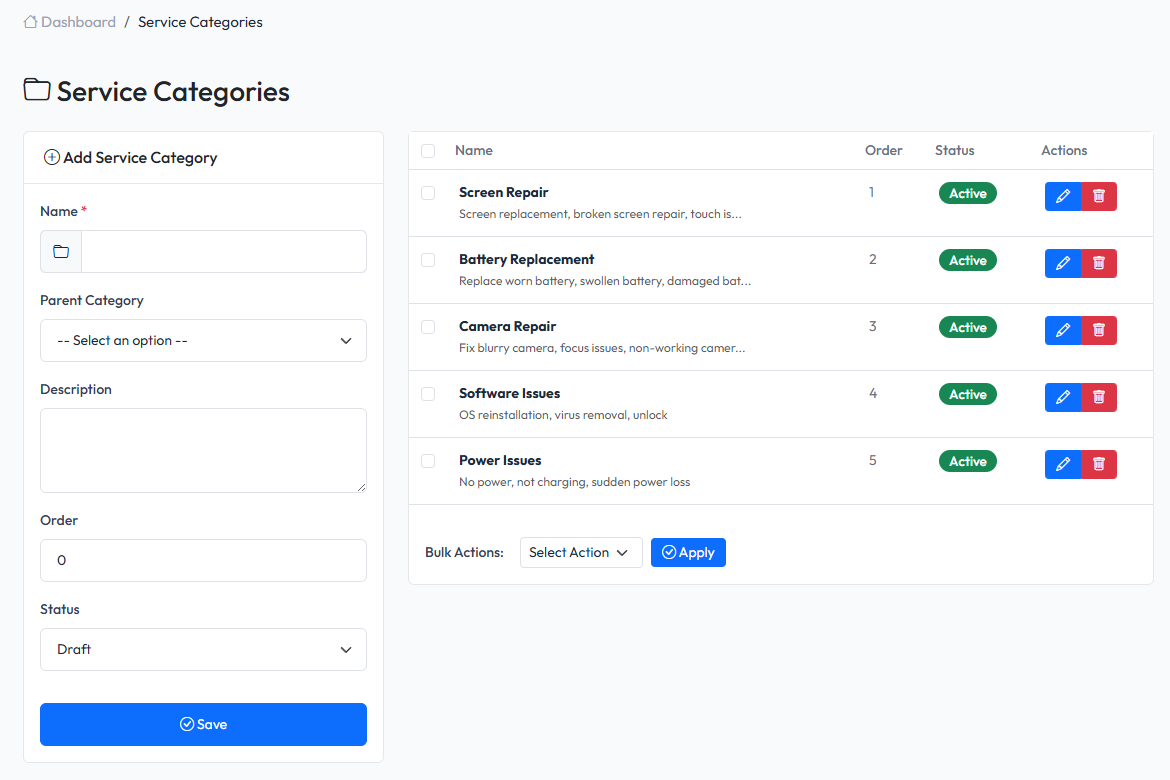
Overview
Service categories help organize your service offerings. Categories can be nested (parent-child) for hierarchical organization.
Viewing Categories
Navigate to Admin > Services > Categories to see all categories.
Creating a Category
- Navigate to Admin > Services > Categories
- Fill in the form on the left side
- Click Save
Category Fields
| Field | Description | Required |
|---|---|---|
| Name | Category name | Yes |
| Parent | Parent category (for nesting) | No |
| Description | Category description | No |
| Status | Active or Inactive | Yes |
Nested Categories
Create a hierarchy by setting a parent category:
Screen Repairs
├── Phone Screen Repairs
└── Tablet Screen Repairs

Battery Replacements
├── Phone Batteries
└── Laptop Batteries
Editing a Category
- Find the category in the list
- Click Edit button
- Modify the information
- Click Save
Deleting a Category
- Find the category in the list
- Click Delete button
- Confirm deletion
Warning: Deleting a parent category will also delete all child categories. Services in deleted categories will become uncategorized.
Using Categories
Filtering Services
On the Services list page, use the category filter to show only services in a specific category.
Assigning Services to Categories
When creating or editing a service, select the category from the dropdown.