Manage part manufacturers and brands.
Overview
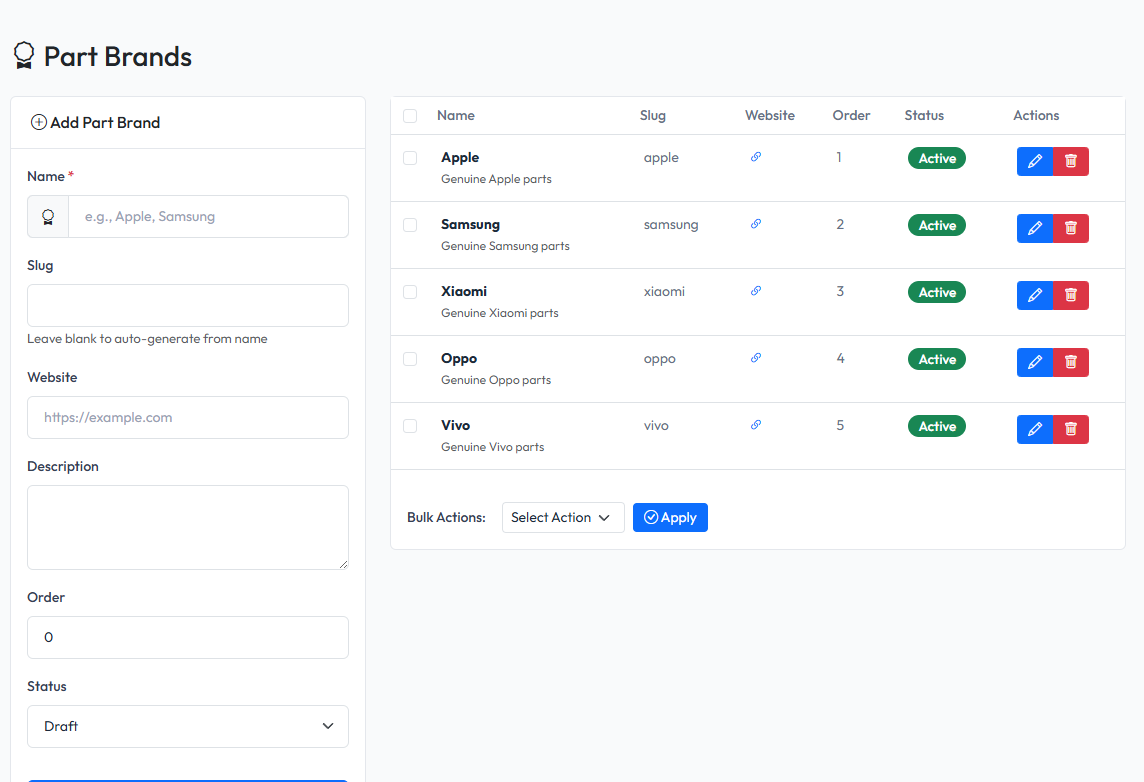
Part brands help identify manufacturers of your parts. Assign brands to parts for better organization and filtering.
Viewing Brands
Navigate to Admin > Parts > Part Brands to see all brands.
Creating a Brand
- Navigate to Admin > Parts > Part Brands
- Fill in the form on the left side
- Click Save
Brand Fields
| Field | Description | Required |
|---|---|---|
| Name | Brand name | Yes |
| Slug | Brand slug | No |
| Website | Brand website URL | No |
| Description | Brand description | No |
| Status | Active or Inactive | Yes |
Editing a Brand
- Find the brand in the list
- Click Edit button
- Modify the information
- Click Save
Deleting a Brand
- Find the brand in the list
- Click Delete button
- Confirm deletion
Note: Deleting a brand does not delete parts. Parts will become unbranded.
Using Brands
Filtering Parts
On the Parts list page, use the brand filter to show only parts from a specific brand.
Assigning Brands to Parts
When creating or editing a part, select the brand from the dropdown.