Generate professional quotations for repair orders before work begins.
Overview
A quotation provides customers with an estimate of repair costs before they approve the work. It includes all proposed parts, services, and estimated totals.
When to Use
- Customer requests a cost estimate
- Before starting repair work
- For complex repairs requiring approval
Generating a Quotation
- Open a repair order (status: Received or Diagnosed)
- Add parts and services to the order
- Click Quotation button
- PDF opens in a new tab
- Print or send to customer
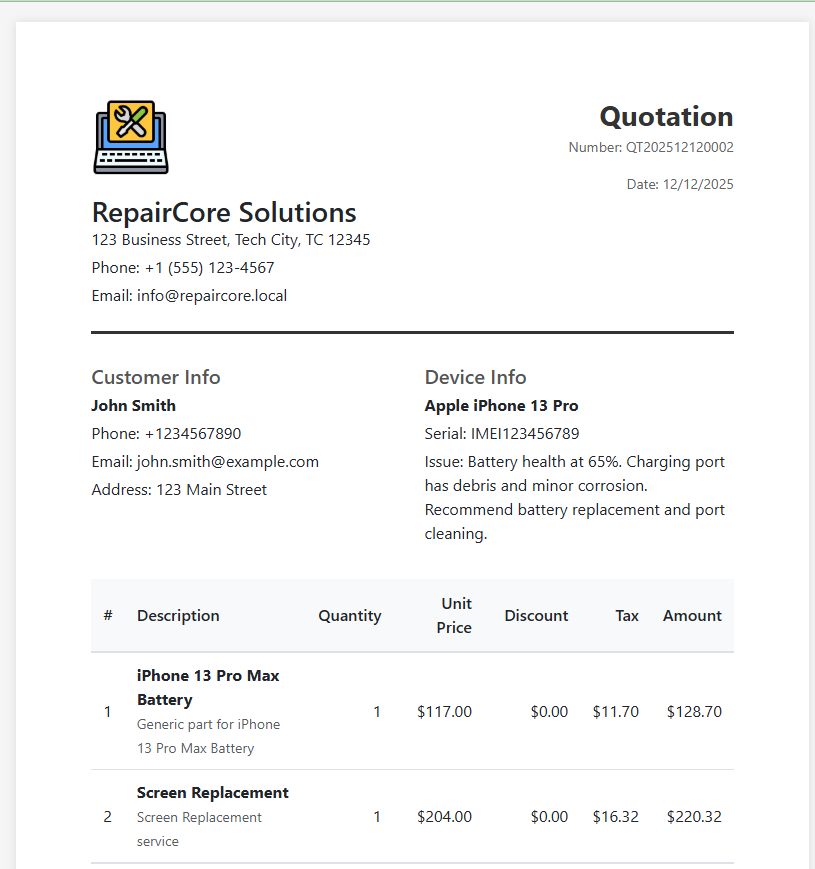
Quotation Contents
Header
- Company logo and information
- Quotation number (format:
QT20241212001) - Date generated
Customer Information
- Customer name
- Contact details
- Device information
Proposed Items
| Column | Description |
|---|---|
| Item | Part or service name |
| Quantity | Number of units |
| Unit Price | Price per unit |
| Tax | Estimated tax |
| Total | Line total |
Totals
- Subtotal
- Estimated tax
- Estimated Total
Terms
- Validity period
- Terms and conditions
- Notes
Quotation Number
Quotation numbers are automatically generated:
- Prefix:
QT - Date:
YYYYMMDD - Sequence:
0001
Example: QT202412120001
Status Requirements
Quotations can only be generated when order status is:
- Received - Just received, awaiting diagnosis
- Diagnosed - Diagnosis complete, awaiting approval
- Repairing - Work in progress
After Customer Approval
Once customer approves the quotation:
- Update order status to "Repairing"
- Proceed with repair work
- Generate Invoice upon completion