Generate warranty certificates for completed repairs.
Overview
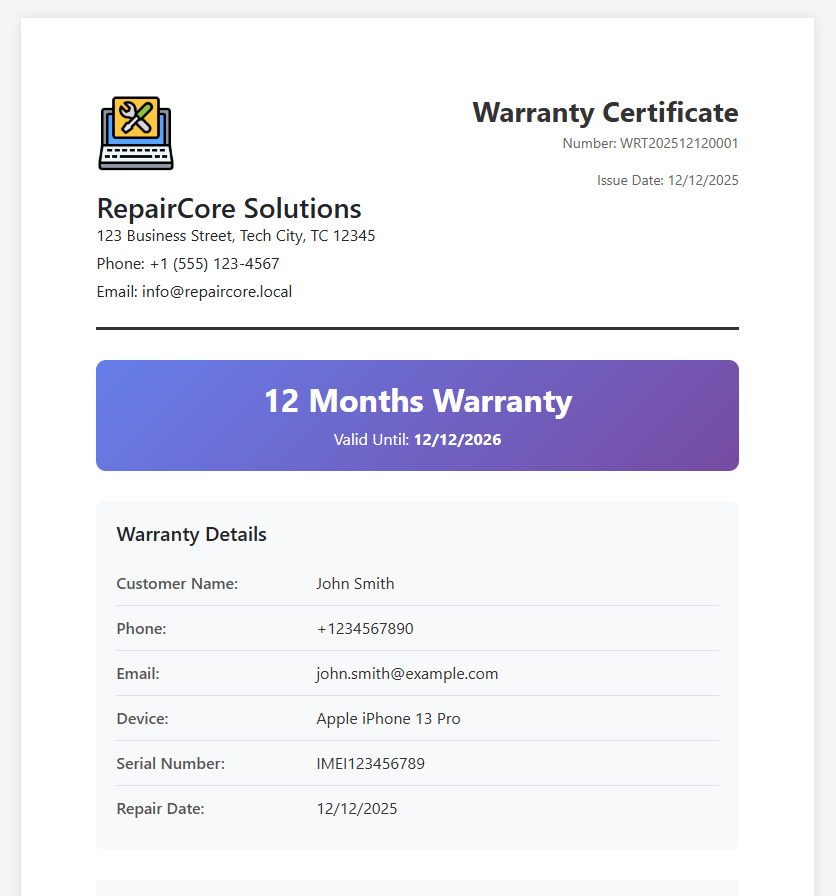
A warranty certificate documents the warranty coverage for a completed repair. It provides customers with proof of warranty and details about what is covered.
When to Use
- After completing a repair
- When delivering device to customer
- Customer requests warranty documentation
Generating a Warranty Certificate
- Open a completed repair order
- Click Warranty button
- PDF opens in a new tab
- Print and provide to customer
Warranty Contents
Header
- Company logo and information
- Warranty certificate number (format:
WRT202412120001) - Issue date
Customer Information
- Customer name
- Contact details
Device Information
- Device brand and model
- Serial number (if available)
- Device description
Repair Details
- Order code
- Repair completion date
- Description of work performed
- Parts replaced
Warranty Terms
| Field | Description |
|---|---|
| Warranty Period | Duration in months |
| Start Date | Date warranty begins |
| Expiry Date | Date warranty ends |
| Coverage | What is covered |
| Exclusions | What is not covered |
Terms and Conditions
- Standard warranty terms
- Claim procedures
- Contact information for claims
Warranty Number
Warranty numbers are automatically generated:
- Prefix:
WRT - Date:
YYYYMMDD - Sequence:
0001
Example: WRT202412120001
Status Requirements
Warranty certificates can only be generated when:
- Order status is Completed or Delivered
Warranty Settings
Configure default warranty settings in Settings > Company:
- Default Warranty Period - Default months of coverage
- Warranty Terms - Standard terms and conditions
Warranty Tracking
The system tracks:
- Warranty start date
- Warranty expiry date
- Warranty months
This information is stored with the repair order for future reference.